
Every campaign shows its status in the Campaigns list, on its detail page and in the sending panel. Here's what each one means, why it appears and what to do; the panel's Learn more link brings you straight to yours.
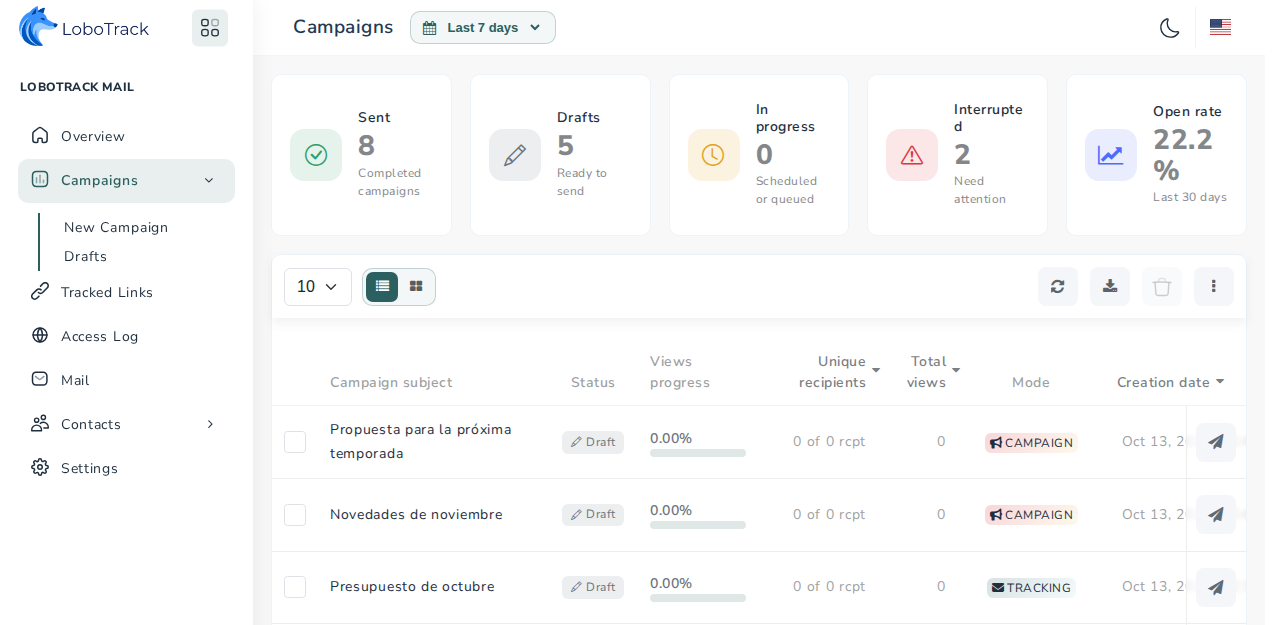
The cards at the top filter the list (Interrupted includes failed campaigns). Partial, Not sent: no active recipients and Unavailable have no card: click their status badge to filter by that status.
Retry send
Retry send is available on Partial, Failed and Interrupted campaigns (in the list and in the notice on the detail page). It sends to everyone still pending and everyone who failed; people who already got the email are skipped, so nobody receives it twice. Fix the cause first, or the campaign will just stop again.
Draft
Never sent. Edit it with Edit draft and send it with Send or schedule….
Scheduled
It goes out on its own at the chosen time, up to about 2 minutes late, without your browser needing to be open. Cancel or reschedule lets you change the date, send it right away or Cancel schedule, which turns it back into a Draft. Edit changes the content, not the time. If the Google account loses its permission first, nothing goes out halfway: it fails and asks you to reconnect.
Queued
It's waiting for its turn because another campaign from the same sending account (or from one that uses the same SMTP server) is going out; they're sent one after another. It will go out automatically, without you doing anything or keeping your browser open.
Sending
It's going out right now. The panel counts Success, Failed, Skipped and Not processed. The server does the sending, at about 60 emails a minute, so you can close the panel with Hide. It can't be paused or stopped.
Sent
Every recipient was processed without failures: they got the email or were skipped (after unsubscribing, for example). Now you can read the results.
Partial
It finished with failures, but more emails were sent (or skipped) than failed. Notice: Some emails could not be delivered.
Usually the mail server rejected some addresses (non-existent ones, say), which are marked Bounced in Contacts and, by default, get no further sends. See who failed and why in Show error log, or by filtering the recipients on the detail page by Failed. If it was something temporary, Retry send.
Failed
At least as many emails failed as were sent or skipped, or the campaign couldn't even start because of a problem with the sending account, its permission or the content. Notice: The campaign could not be completed.
Check Show error log and look at the account in Settings › Sending accounts: a Gmail account showing reconnection needed or token expired is fixed with Refresh account access (My mailbox needs reconnecting); an SMTP server showing connection failed, by correcting its details. Then Retry send.
Interrupted
It stopped before processing everyone: what was sent stays sent, the rest stays pending. The notice says The campaign was stopped and no more emails will be sent., but you can pick it up again. It won't resume by itself, not even the next day: click Retry send once you've dealt with the cause. If a quota was already used up, it ends up here without sending anything. The panel tells you why:
| Message | Cause | What to do |
|---|---|---|
| The account-wide daily email quota has been reached. | Your plan's daily quota | Wait for the reset (00:00 UTC) or upgrade your plan |
| The account-wide daily attachment quota has been reached. | Daily quota of emails with attachments | Same as above |
| The configured send limits for this account have been reached… | The sending account's daily maximum (rolling 24 hours) or the per-campaign maximum | Wait, or raise the limit under Configure sending |
| The send stopped after consecutive failures. | Three failures in a row | Check the error log and the sending account |
| The Google account needs to be reconnected… | Google's permission expired or was revoked | Reconnect Google account and retry: it carries on without duplicates |
For any other reason, retry and, if it happens again, get in touch. More in Sending limits and I've reached my sending limit.
Not sent: no active recipients
Nothing went out because every recipient was skipped: they unsubscribed from the campaign's list, they're marked Bounced or Blocked, or the list's policy leaves them out (Confirmed subscribers only, for example). Check their status in Contacts and the list's sending behaviour: Bounces, blocks and unsubscribes.
Unavailable
LoboTrack couldn't read the email's content. This only happens when sending from a Gmail account, because the content is kept as a draft in that Gmail: the draft was deleted before sending, or Google's permission expired (Original email data could not be retrieved from Gmail. It may have been deleted or the token expired.). There's no Retry send here: reconnect the account if the permission was the problem, then create the campaign again. To avoid it, don't delete those drafts from Gmail until the campaign has gone out.