
Each subscriber list decides how its recipients can unsubscribe, and these are two independent decisions: the one-click header and the link in the email body. Both are configured per list, under This list's settings › Send behavior (the gear icon on the list, in Contacts › Subscriber lists).
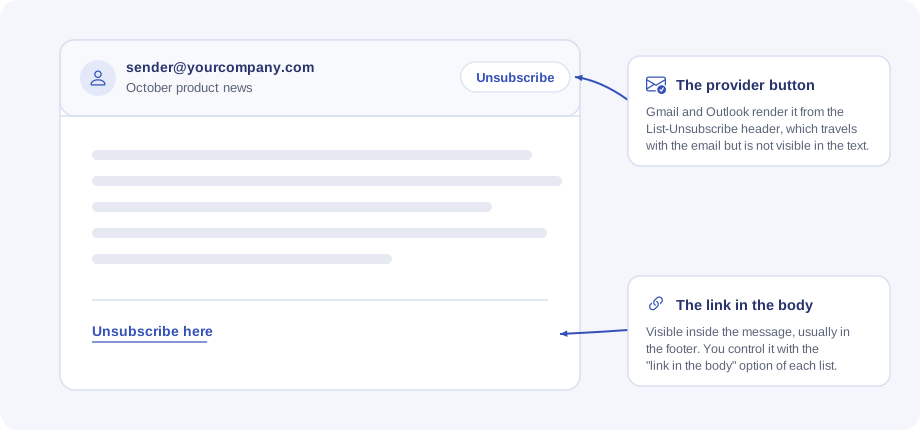
The one-click header
It is a technical signal (the List-Unsubscribe and List-Unsubscribe-Post headers) that travels with every email of the list. It is not visible inside the message: Gmail and Outlook turn it into their own "Unsubscribe" button, next to the sender.
- With the header (recommended). It is the best thing for your sender reputation, and without it emails end up in spam sooner. In exchange, providers treat the email as list mail and may move it to Promotions or Forums instead of leaving it in the primary tab.
- Without the header. The email looks more personal and usually stays in the main inbox, but without the one-click unsubscribe path there is a higher risk of being marked as spam, especially on large sends.
The link in the body
This is the visible unsubscribe link inside the message. Here the option decides what happens when the email does not already carry one:
- Add a footer with the link if missing. If you compose an email without an unsubscribe link, the send appends a footer with one (the default footer, or the custom footer you saved on the list). It is the safest option: no send goes out without a visible way to unsubscribe.
- Only where I place it. The link appears only where you put it, with the editor's "Add unsubscribe link" button. If you forget to add it, the email goes out without a visible link — and if the header is off as well, without any unsubscribe path at all.
What happens when someone unsubscribes
Both paths end in the same place. When recipients click the link, they see a page that asks them to confirm (so an antivirus that opens links cannot unsubscribe anyone by mistake); Gmail's button unsubscribes in one click. The unsubscribe applies to that list: the contact is marked as cancelled on it and the list's next sends no longer write to them, but your other lists are not affected.
How to combine them
The two options are deliberately independent. The default combination — header on and link "only where I place it" — complies with Gmail and Yahoo without adding anything visible to your emails. If you prefer that a visible link is never missing, turn on the guaranteed footer. And remember the account has to be properly connected to send: if you are just starting out, see Connect your Gmail account.