
You send a campaign and, two or three seconds later, an access shows up. Nobody reads that fast — and indeed, nobody did: it is the recipient's email provider downloading the tracking image automatically. LoboTrack knows this and does not count it as an open. Here is the full why.
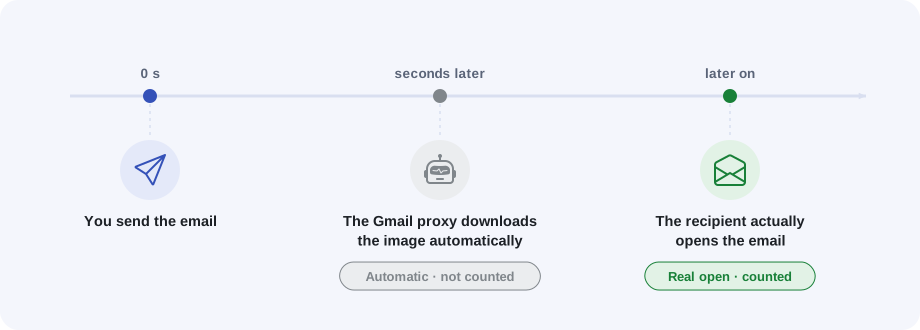
What is going on
Gmail does not let the images of an email reach the reader directly: it serves them through its own servers (an image proxy) and often downloads them in advance, right after the email arrives, before anyone opens it. Other systems do similar things: corporate antivirus and security scanners open links and download images of incoming email to inspect them.
To a naive tracking system, every one of those downloads would look like an open. That is why many tools inflate their numbers.
What LoboTrack does with them
Every access is classified on the server by the client making it, the network it comes from and the moment it arrives:
- Automatic download (prefetch). A download made by a proxy a few seconds after the send is marked "Prefetch (automatic)": it does not count as an open and does not mark the email as opened.
- Security scanners. Accesses from antivirus and corporate filters are marked "Scanner" and do not count either.
- Real opens through the proxy. If the Gmail proxy downloads the image later — when the recipient actually opens — that does count as an open. It is shown with the "via proxy" note and without a location on the map, because the visible address is Gmail's server, not the reader's.
Where to see it
In the Access log, every filtered access stays visible, marked "Automatic" with its explanation: it does not count, but you can audit it. The "Hide scanners" filter removes scanners from the list; automatic downloads are always shown, marked, so the figures never look like they are hiding traffic.