
LoboTrack's tracking relies on two simple, time-honored email mechanisms: an image that is downloaded when the message is opened, and links that pass through the server on their way to the destination. Here is how both work, what gets recorded and, just as important, what they cannot know.
Opens: an image at the end of the email
Every tracked email carries a small image at the end of the message, unique to each recipient. When the recipient opens the email, their mail app downloads that image from the LoboTrack server, and that download is the open: it is recorded with the date, the mail client and, when the network allows it, the approximate location.
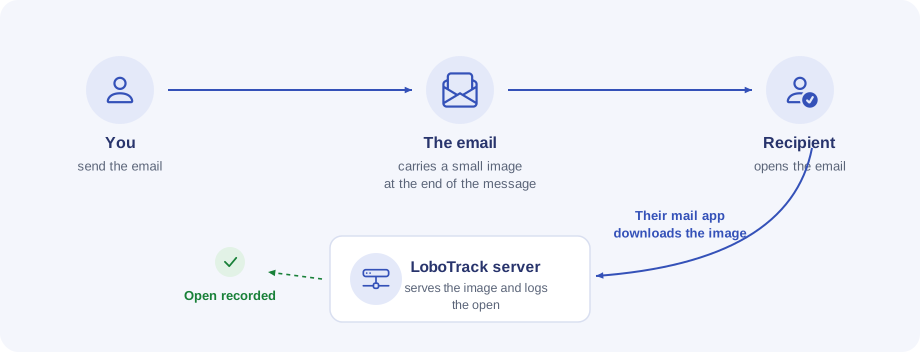
Which image it is depends on your plan: on a paid plan it is a transparent 1×1 pixel, invisible; on the Free plan it is the visible LoboTrack mark. Tracking works the same either way.
Clicks: links that pass through the server
If you enable link tracking, the links in the email are rewritten to point first at the LoboTrack server, which logs the click and immediately redirects to the real page. The recipient lands where they always would; the extra hop takes milliseconds.
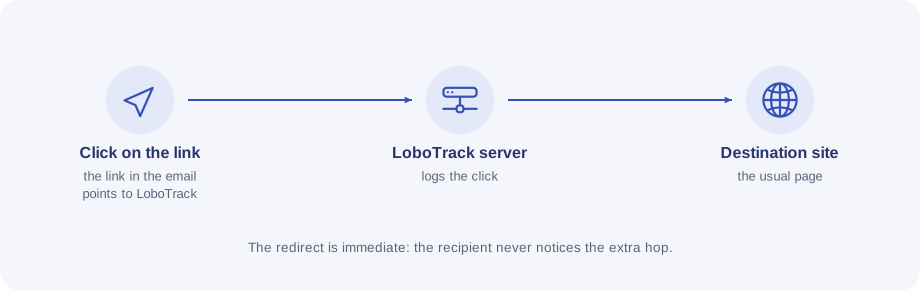
Two details of this mechanism:
- The unsubscribe link is never tracked: it travels separately, straight to the unsubscribe page.
- A click also counts as an open. If the recipient blocks images, the open goes unnoticed, but the click gives it away: LoboTrack records it anyway.
Where you see it all
- The campaign detail summarizes sent emails, unique readers and clicks. The open rate is always unique readers over emails sent.
- Access log lists every open and every click with its type, mail client, device and location, with a map by country and per-campaign filters.
- Tracked links gathers your links with their total clicks, the last click and the last campaign that used them.
What tracking cannot know
Measuring email has physical limits, and we would rather explain them than hide them:
- Blocked images. If the recipient does not load images, their open is invisible — only a click would reveal it.
- Automatic downloads. Gmail and other providers sometimes download the image right after the email arrives, with nobody opening it. LoboTrack detects these and does not count them: the detail is in Why do I see an open right after sending?.
- Location behind a proxy. Gmail downloads images through its own servers: the location of those opens is Gmail's server, not the reader's, so it does not count on the map. Apple Mail with privacy protection gives an approximate location, and it is marked as such.
- Forwards. A forwarded copy carries the same image and the same links: there is no reliable way to know who opens it. When the signs point to another reader, LoboTrack marks it as a "possible forward", never as a certainty.